
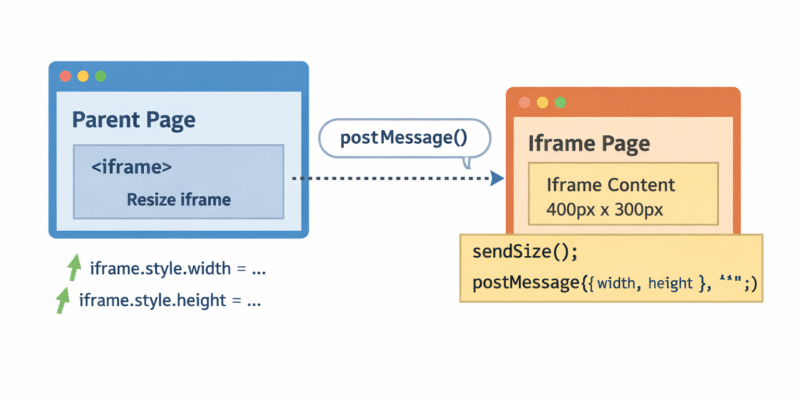
Embedding content using an <iframe> is a common technique for widgets, dashboards, payment forms, and third-party integrations. However, one long-standing problem remains: An iframe does not automatically resize itself to match the size of its content.
I have been asked recently to embed an Iframe to a website page, the iframe was for a multi-step form created with a third party tool. However we faced a common issue related to iframe embeding which is how to properly resize it to fit it’s contents.
From the solutions i tried using CSS and media queries to resize the iframe, but this was not the optimal solution as this leads to scrollbars and clipped contents. This article explains a better solution using javascript postMessage() function used in production systems like YouTube embeds.
Note: this technique only works when you control (or can modify) the page loaded inside the iframe.
The iframe must run the measurement and send its size to the parent using postMessage. If you are embedding a third-party site you cannot modify, automatic resizing is not possible.
Cross-window messaging
The browser provides a safe API for communication between windows and iframes:
window.postMessage.
The iframe measures its own content and sends the dimensions to the parent. The parent then applies those values to the <iframe> element.
Step 1 — Wrap the iframe content
Inside the iframe page, wrap all content in a single container: